Google Antigravity
Build an agent on Google Antigravity that fixes a repository's failing CI and proves the fix, while CopilotKit's chat shows the diff, the live test results and each approval.
Open your coding agent in your project's folder, or in an empty folder for a new app.This runs in a coding agent on your computer.
Google Antigravity is Google's agent SDK. Its
harness calls Gemini and gives the agent real tools: it reads and edits files and runs shell commands in a folder you
choose. The
Antigravity AG-UI SDK (ag-ui-antigravity)
serves that agent over AG-UI, so a CopilotKit app can chat
with it.
Antigravity in OpenBot
OpenBot ships Google Antigravity as one of its Bots, built on the same Antigravity AG-UI SDK. If you want Antigravity in a ready-to-run, self-hosted app, start with agent-antigravity.
This recipe walks through Repo Doctor, an app that fixes broken CI on GitHub repos. It reads the CI results, runs the tests, reproduces the failure, then fixes the code, shows the change as a diff and proves the fix before pushing it. You approve or deny each risky step, or let auto-approve handle it, then download a report of the whole run.
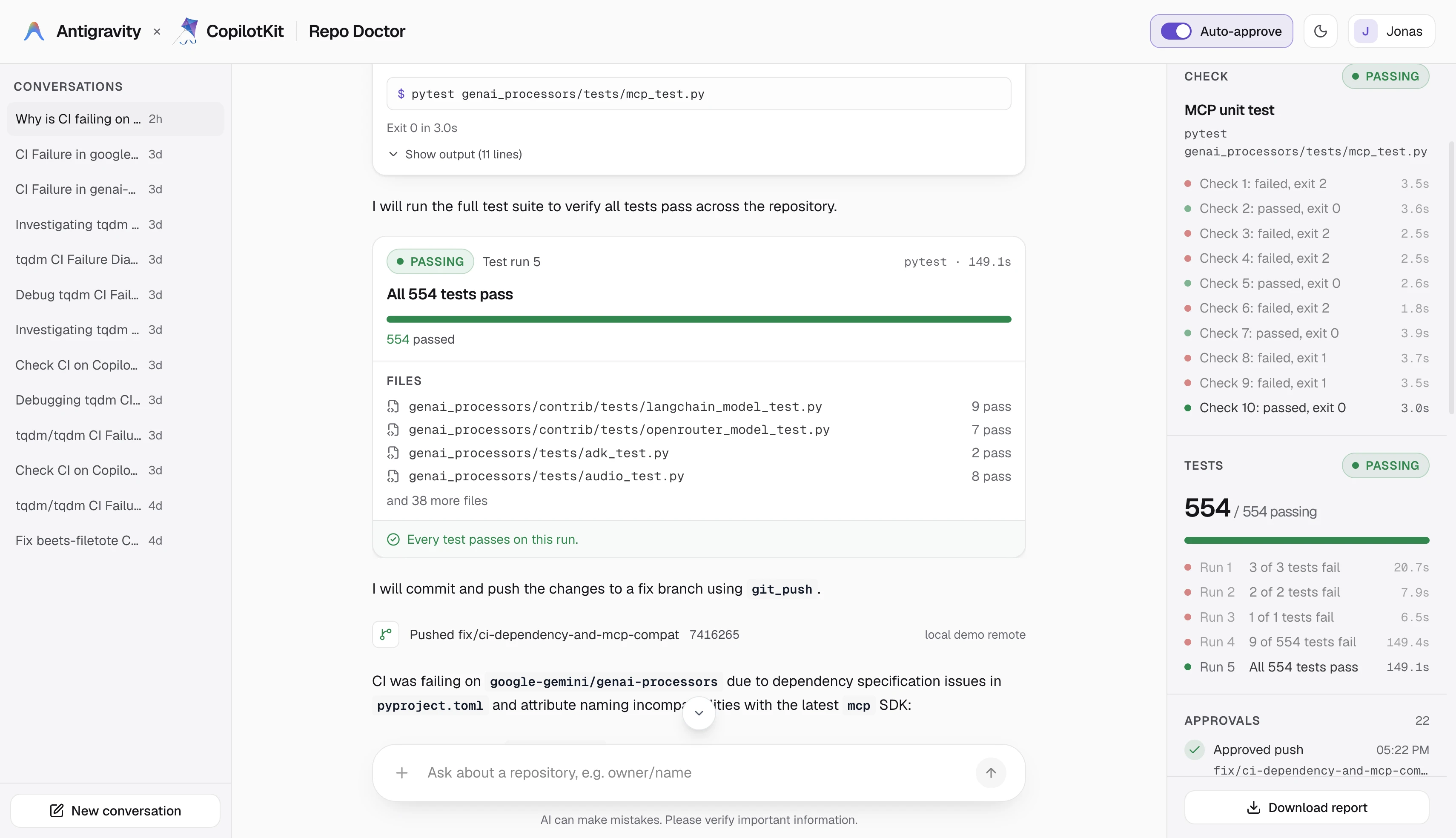
| Part | Responsibility |
|---|---|
| Antigravity | The harness. Calls Gemini and runs the built-in file and shell tools inside the conversation's folder. |
| Antigravity AG-UI SDK | Serves the agent over AG-UI, pauses risky tools as interrupts, and syncs shared state. |
| Repo Doctor tools | Clone the repository, read CI, install, test, run a check, show the diff, and push. |
| CopilotKit + AG-UI | The chat, the approval cards, the diff card, the A2UI test results card, and the side panel. |
| CopilotKit Intelligence | Saves each person's conversations and records Product Analytics. |
This recipe renders tool calls and A2UI surfaces, and pauses the agent for approvals. For the background, see Generative UI and Human-in-the-loop.
What you'll build#
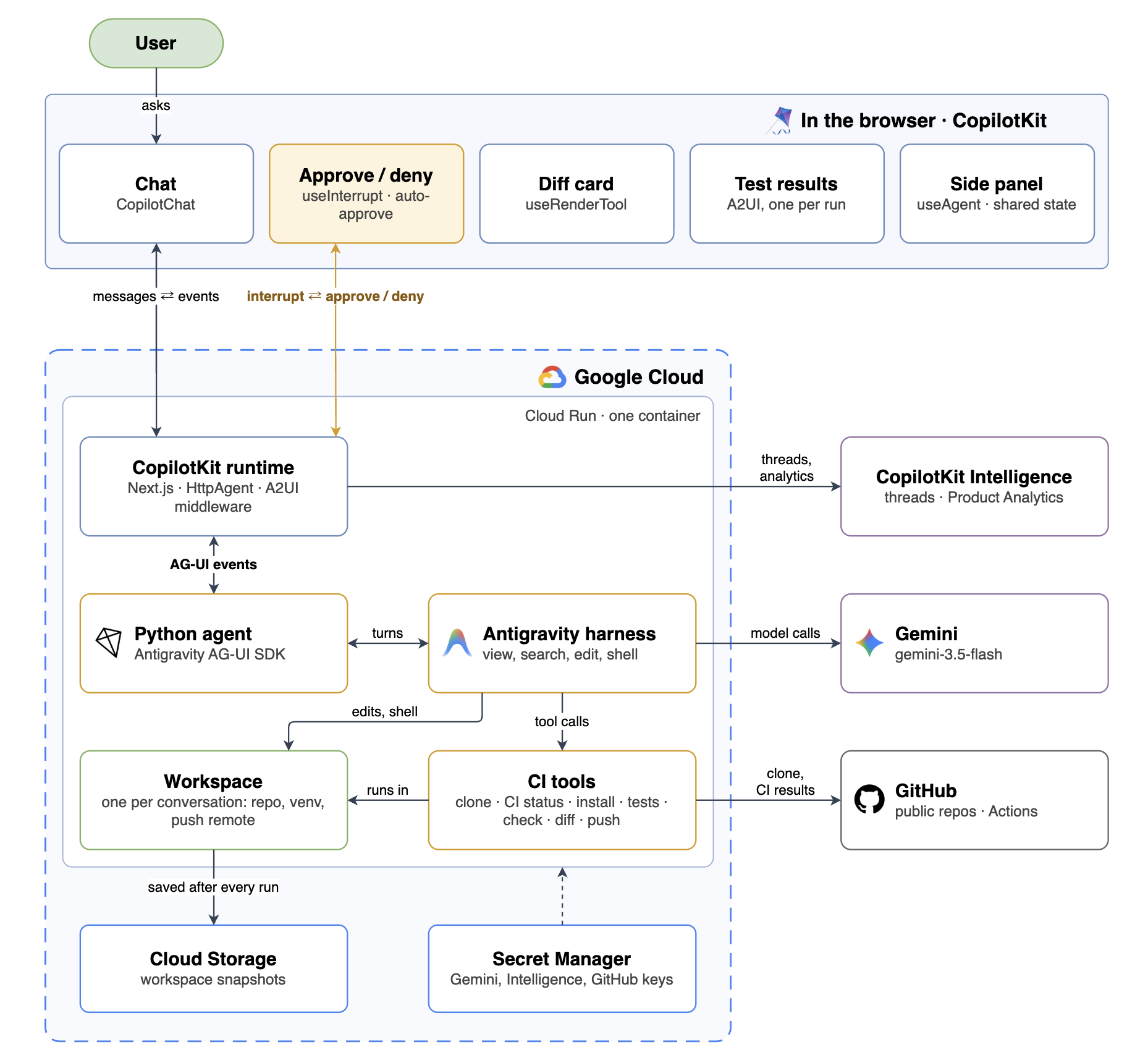
A chat that takes a repository from failing CI to a pushed fix:
- You name a public GitHub repository, or click one of the cards on the start screen.
- The agent reads CI and tells you what is failing. Each risky step (an install, a check, a file edit, a push) shows up as a card with Approve and Deny.
- You watch the test results go from red to green in the chat, with the change shown as a diff.
- At the end you get a pushed fix branch and a report you can download.
The side panel keeps track of the repository, the check, every test run and every decision you made.
Before you start#
You'll need Node.js 22 or newer, pnpm, Python 3.13, uv, git,
and a C compiler for projects with native extensions (the Xcode command line tools on macOS). Get a Gemini API key
from Google AI Studio.
The agent installs and runs the cloned repository's code on your machine, so try it on repositories you trust.
Quick start#
The finished example lives in the CopilotKit repo:
git clone --depth 1 https://github.com/CopilotKit/CopilotKit.git
cd CopilotKit/examples/showcases/antigravity-repo-doctor
pnpm install && pnpm dev
The first pnpm dev creates .env, installs the Python agent with uv and stops until you add your Gemini key. Add
it and run pnpm dev again. Open http://localhost:3000, type your name in the navbar, and
click the google-gemini/genai-processors card.
The steps below build the same app one piece at a time. Every snippet comes from the example, and each title is the
file it lives in, so you can open the full file next to the page. A # ... or // ... line marks code left out.
Build it step by step#
Create the web app#
Repo Doctor is two processes: a Next.js app with the chat and the CopilotKit runtime, and a Python agent next to it
in agent/. Start with the Next.js app and the CopilotKit packages, at the versions the example uses:
pnpm create next-app@16.4.1 repo-doctor --yes
cd repo-doctor
pnpm add @copilotkit/react-core@1.79.0 @copilotkit/runtime@1.79.0 @copilotkit/a2ui-renderer@1.79.0 @ag-ui/client@1.0.2 zod@3.25.76
@copilotkit/a2ui-renderer draws the test results card, and @ag-ui/client connects the runtime to the Python agent.
The A2UI catalog needs zod 3, so zod stays on 3.25.76.
The provider wraps the app. It points at the runtime route, registers the A2UI catalog for the test results card (you'll build it in a later step), and turns on the CopilotKit Inspector in development:
"use client";

import {
  CopilotChatConfigurationProvider,
  CopilotKit,
} from "@copilotkit/react-core/v2";
import { catalog } from "@/a2ui/catalog";
// ...

const A2UI = { catalog };

// ...

export function AppShell(props: ShellProps) {
  return (
    <CopilotKit
      runtimeUrl="/api/copilotkit"
      useSingleEndpoint={false}
      a2ui={A2UI}
      enableInspector={process.env.NODE_ENV === "development"}
    >
      <CopilotChatConfigurationProvider agentId={AGENT_ID}>
        {/* ... */}
      </CopilotChatConfigurationProvider>
    </CopilotKit>
  );
}
src/app/page.tsx renders AppShell, which lays out the chat in the middle and the side panel on the right. The
chat is CopilotChat, pointed at the agent:
<CopilotChat
  // ...
  agentId={AGENT_ID}
  className="h-full"
  welcomeScreen={Welcome}
  // ...
/>
welcomeScreen replaces the empty chat with the start screen and its repository cards. The full layout is in
app-shell.tsx
and
chat-panel.tsx.
Create the agent#
The agent is a uv project in agent/. Create it and add the Antigravity SDK and its AG-UI adapter in one go:
uv init --package --name repo-doctor agent
cd agent
uv add ag-ui-antigravity==0.2.1 google-antigravity==0.1.22 ag-ui-protocol==1.0.0 fastapi==0.143.2 "uvicorn[standard]==0.54.0" pydantic==2.14.1 pydantic-settings==2.16.0
google-antigravity is the SDK with the harness, and
ag-ui-antigravity serves it
over AG-UI.
Copy these helpers from the example's agent folder:
config.pyreads.envand sets the folders the agent works in.shell.pyruns commands,workspace.pymanages the conversation's folder, andproject.pyworks out the install and test commands.
The agent is an AntigravityAgent from the Antigravity AG-UI SDK, here through a small subclass. The config picks
the model and the prompt, lists the built-in tools the agent may use, points the harness at a workspace folder, and
turns on approvals:
# ...
def create_agent(settings: Settings) -> ThreadScopedAntigravityAgent:
    # ...
    return ThreadScopedAntigravityAgent(
        settings=settings,
        # ...
        model=settings.gemini_model,
        api_key=settings.gemini_api_key.get_secret_value(),
        # ...
        system_instructions=SYSTEM_INSTRUCTIONS,
        capabilities=CapabilitiesConfig(enabled_tools=ENABLED_BUILTINS, enable_subagents=False),
        # Replaced per thread by ThreadScopedAntigravityAgent._build_agent.
        workspaces=[str(settings.workspace_root)],
        # ...
        tool_approval=True,
        auto_approve_tools=list(AUTO_APPROVED),
        # ...
    )
tool_approval=True pauses every tool call that is not in auto_approve_tools:
- Runs on its own: the read-only built-ins (list, search, find and view files), plus
clone_repo,ci_status,run_testsandshow_diff. - Waits for you: installs, checks, file edits, shell commands and pushes.
ENABLED_BUILTINS turns on the file and shell tools plus finish, which the harness needs to end a turn.
The prompt in
prompts.py
tells the model which tool to use when, and that a fix only counts as verified when a check goes from failed to
passed.
One call turns the agent into an AG-UI endpoint. create_antigravity_app returns a FastAPI app that serves the agent
at POST /:
from ag_ui_antigravity import create_antigravity_app

# ...

def create_app() -> FastAPI:
    settings = get_settings()
    # ...
    agent = create_agent(settings)
    app: FastAPI = create_antigravity_app(agent, path="/")
    # ...
    return app


def main() -> None:
    settings = get_settings()
    # ...
    uvicorn.run(create_app(), host=settings.agent_host, port=settings.agent_port)
Both processes read the same .env at the project root. Put your Gemini key in it, and a GitHub token if you have
one (a read-only token raises the CI lookups from 60 to 5,000 an hour). AGENT_URL tells the web app where the agent
listens:
GEMINI_API_KEY=
GITHUB_TOKEN=
AGENT_URL=http://127.0.0.1:8000/
Start the agent from agent/ with uv run python -m repo_doctor.server. It listens on 127.0.0.1:8000.
Connect the runtime#
The runtime route connects the chat to the Python agent over AG-UI. HttpAgent sends each run to the agent's URL,
and the a2ui option turns on the A2UI middleware, which passes the agent's test results cards to the chat:
import { HttpAgent } from "@ag-ui/client";
import {
  CopilotRuntime,
  createCopilotRuntimeHandler,
} from "@copilotkit/runtime/v2";
// ...

const agent = new HttpAgent({ url: env.AGENT_URL });

const runtime = new CopilotRuntime({
  agents: { [AGENT_ID]: agent },
  a2ui: { injectA2UITool: false },
  // ...
});

const handler = createCopilotRuntimeHandler({
  runtime,
  basePath: "/api/copilotkit",
});

export const GET = handler;
export const POST = handler;
export const PATCH = handler;
export const DELETE = handler;
The harness calls Gemini, so the runtime never calls a model itself. injectA2UITool: false tells the runtime that
the agent writes its own A2UI surfaces, so the model gets no extra render tool. The left-out lines connect CopilotKit
Intelligence when you add a key, which the CopilotKit Intelligence section covers.
Run pnpm dev in one terminal and the agent in another. Open http://localhost:3000 and say
hello. The agent answers in the chat.
Give the agent its CI tools#
The agent's own tools live in tools.py:
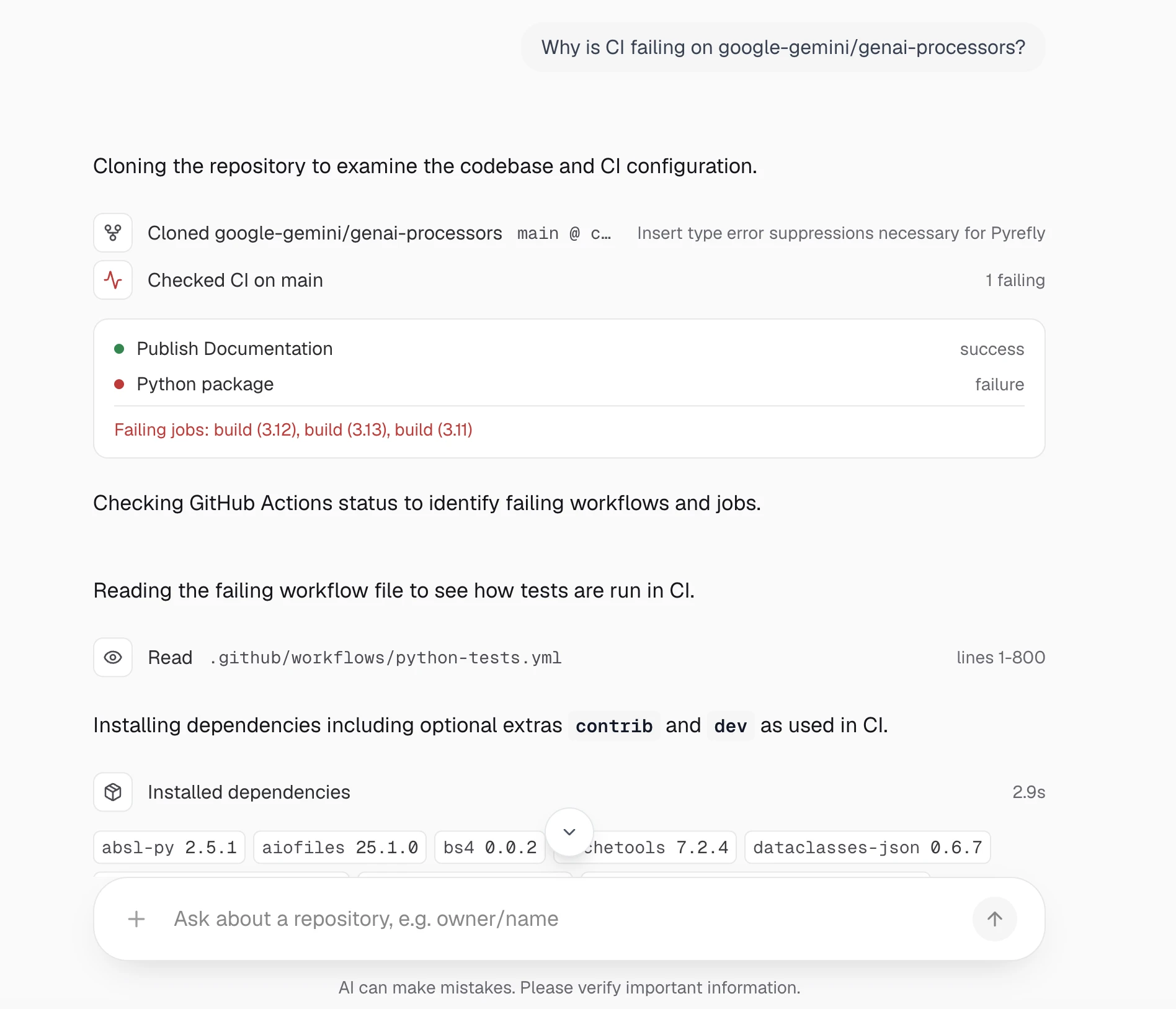
clone_repomakes a shallow clone.ci_statusreads the latest GitHub Actions results and names the failed jobs and steps.install_dependenciesinstalls the project.run_testsruns the test suite.run_checkruns one command that reproduces the failure.show_diffreturns the realgit diff.git_pushcommits the fix on a new branch and pushes it to a local repository, never to GitHub.
Each one is a plain async function with a docstring. The SDK reads the signature and the docstring and offers the function to the model next to Antigravity's built-in file tools.
Tools keep a record of what happened in shared state, which the side panel reads later.
experimental_set_state replaces that state and streams it to the browser right away, so this helper merges each
change into the current state:
from ag_ui_antigravity import experimental_get_state, experimental_set_state

# ...

def _update_state(**changes: Any) -> None:
    experimental_set_state({**_state(), **changes})
clone_repo is the first tool the agent calls. It clones the repository, then stores what it learned under repo
in shared state:
async def clone_repo(repo_ref: str) -> dict[str, Any]:
    """Clones a public GitHub repository into this conversation's workspace."""
    try:
        slug = parse_repo_ref(repo_ref)
    except ValueError as exc:
        return _error(str(exc))
    # ...
    cloned = await shell.run(
        [
            "git",
            "clone",
            "--depth",
            "1",
            "--no-tags",
            f"https://github.com/{slug}.git",
            ".",
        ],
        cwd=repo,
        timeout=timeout,
    )
    if not cloned.ok:
        return _error(f"git clone failed: {cloned.output.strip()[-800:]}")
    await ensure_local_push_remote()
    # ...
    info: dict[str, Any] = {
        "slug": slug,
        "path": str(repo),
        "url": f"https://github.com/{slug}",
        "branch": branch,
        # ...
    }
    # ...
    _update_state(repo=info)
    # ...
A few things to notice:
- Errors come back as
{"ok": False, "error": ...}instead of being raised, so the model reads them and decides what to do next. ensure_local_push_remoterenames the GitHub remote toupstream, turns off its push URL and adds a local bare repository asorigin.git_pushthen pushes to that bare repository by its path, not toorigin, with git hooks off, and refuses when the repository's config rewrites URLs. A push can never reach GitHub, even if a shell command changesorigin.ci_statusruns next. It lists the failed steps of each workflow, which is usually enough for the model to find the matching command in the workflow file (ci.py).
build_tools(workspace, settings) returns the seven tools bound to one folder. ThreadScopedAntigravityAgent calls
it for each conversation in _build_agent (agent.py), so two conversations
never share a checkout.
Prove the fix#
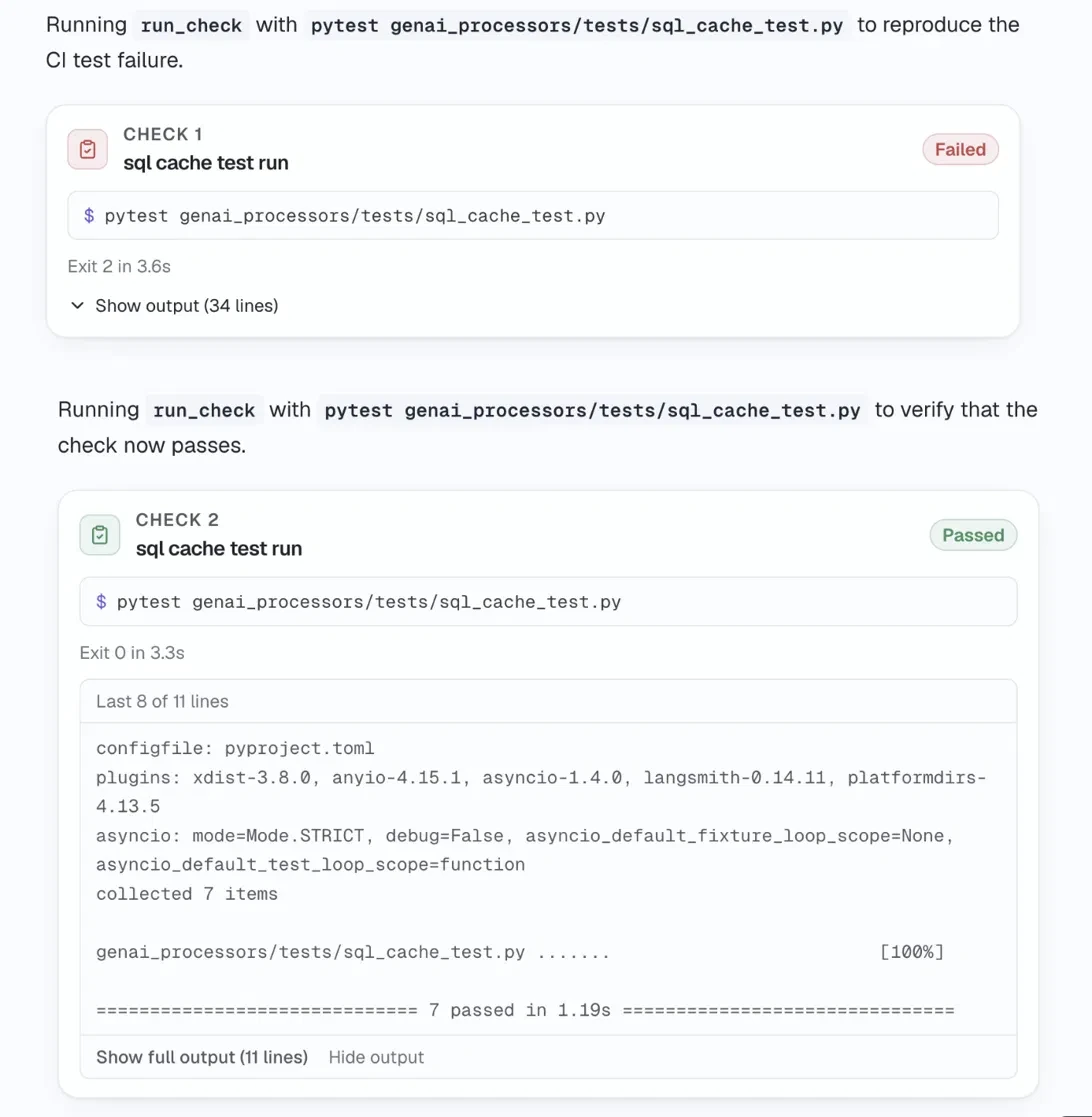
Passing tests alone do not prove that the fix addressed the failure CI saw. That is the job of run_check. The
agent turns the failing CI step into one short command and runs it twice: before the fix, when it must fail, and
after the fix, when it must pass:
async def run_check(command: str, label: str) -> dict[str, Any]:
    """Runs one shell command that reproduces a failing CI step, and records it."""
    # ...
    result = await shell.run(
        [shell_bin, "-c", command], cwd=repo, timeout=CHECK_TIMEOUT_SECONDS, env=_check_env()
    )
    # ...
    exit_code = result.exit_code
    status = "passed" if exit_code == 0 else "failed"
    # ...
    checks: list[dict[str, Any]] = list(_state().get("checks", []))
    number = len(checks) + 1
    record = {
        "run": number,
        "label": label,
        "command": command,
        "status": status,
        # ...
    }
    checks.append(record)
    _update_state(checks=checks)
    return {
        "ok": True,
        **record,
        "output_tail": _ANSI.sub("", result.output)[-_CHECK_TAIL_CHARS:],
}- The exit code decides passed or failed. A check that runs past two minutes counts as failed.
- Every check is added to
checksin shared state, so the side panel lists the failed run and the passed run together.
Approve or deny each risky step#
When the model calls a tool that needs approval, the adapter keeps the call waiting and ends the run with an
interrupt. Its reason is tool_approval, and its metadata carries the tool's name and arguments.
useInterrupt renders a card for it, and resolve sends your answer back with the
interrupt's id, which continues the waiting call:
useInterrupt({
  agentId: AGENT_ID,
  enabled: (event) =>
(event.value as { reason?: string } | undefined)?.reason ===
    "tool_approval",
  render: ({ interrupt, resolve }) => {
    const { tool_name, args, ...meta } = (interrupt?.metadata ?? {}) as {
      tool_name?: string;
      args?: Record<string, unknown>;
    } & Record<string, unknown>;
    const tool = tool_name ?? "tool";
    return (
      <ApprovalCard
        key={interrupt?.id}
        request={{ tool, args: args ?? {}, meta }}
        repoPath={repoPath}
        autoApprove={autoApprove && !ALWAYS_ASK.has(tool)}
        onAnswer={(answer: ApprovalAnswer) => resolve(answer, interrupt?.id)}
      />
    );
  },
});
The card sends { approved: true } or { approved: false, message }, the shape the adapter reads. A denied call
is blocked, and your message goes back to the model so it knows why you said no.
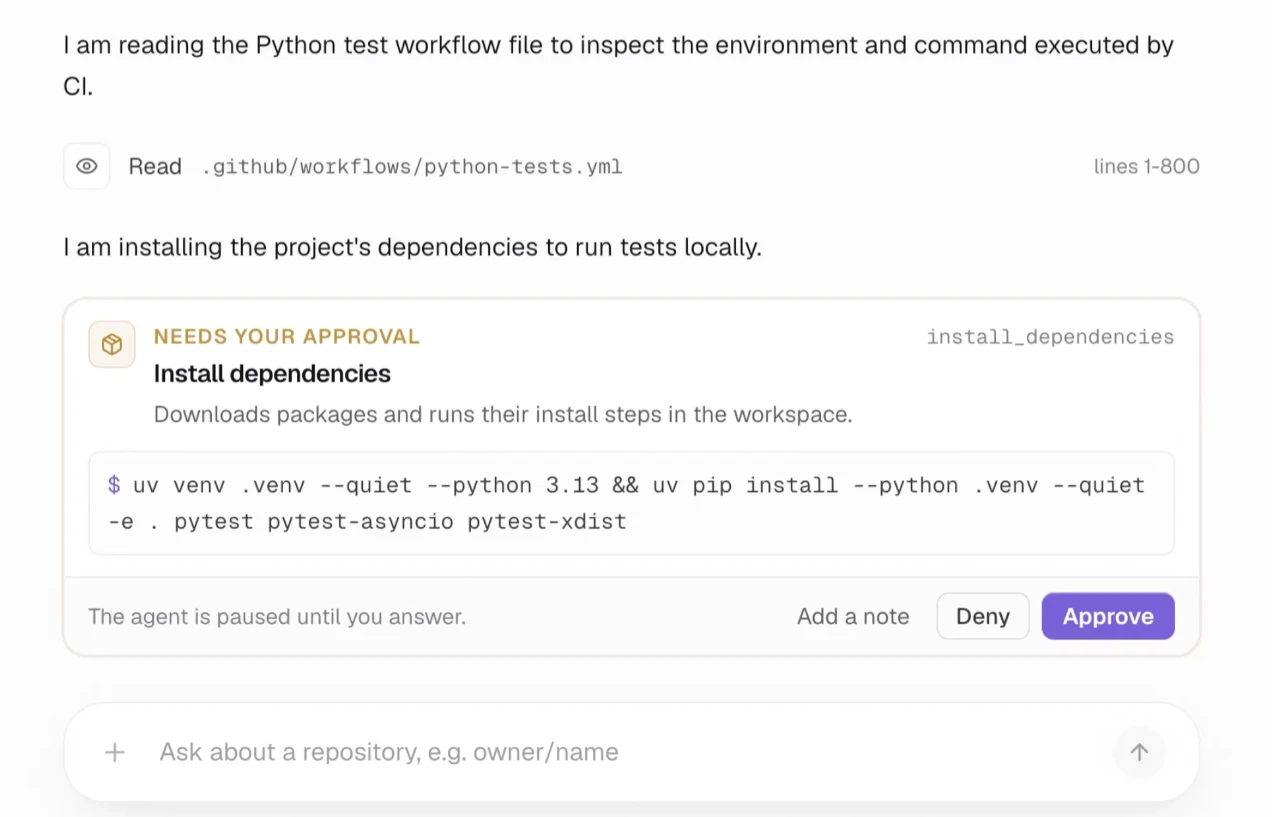
- The card shows exactly what will run: the install command, the check, the lines a file edit changes, or the branch it pushes.
- With the navbar's Auto-approve switch on, the card answers by itself. Pushes are on an always-ask list, so the switch never answers them.
- The agent logs every decision under
approvalsin shared state.
Show the fix as a diff#
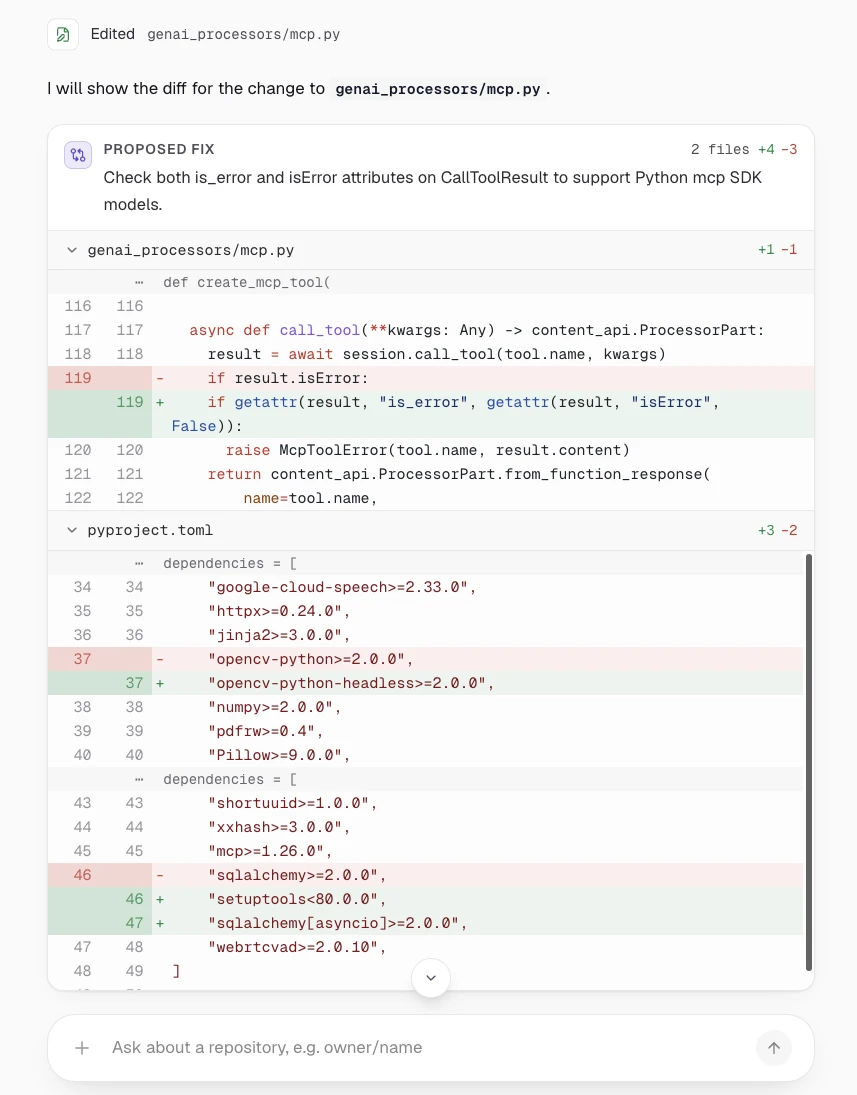
show_diff returns the workspace's real git diff and a one-sentence summary from the model.
useRenderTool matches a tool call by name and draws it in the chat:
const Any = z.record(z.unknown());

// ...

useRenderTool({
  name: "show_diff",
  agentId: AGENT_ID,
  parameters: Any,
  render: (p) => <DiffBlock status={p.status} result={p.result} />,
});p.statusmoves frominProgresstoexecutingtocomplete.p.resultholds the tool's JSON result once it finishes.DiffBlockwaits forcomplete, then hands the summary and the patch toDiffCard, which draws each file with its added and removed lines.
The other tools get a row or a card the same way in
tool-renderers.tsx.
Draw the test results with A2UI#
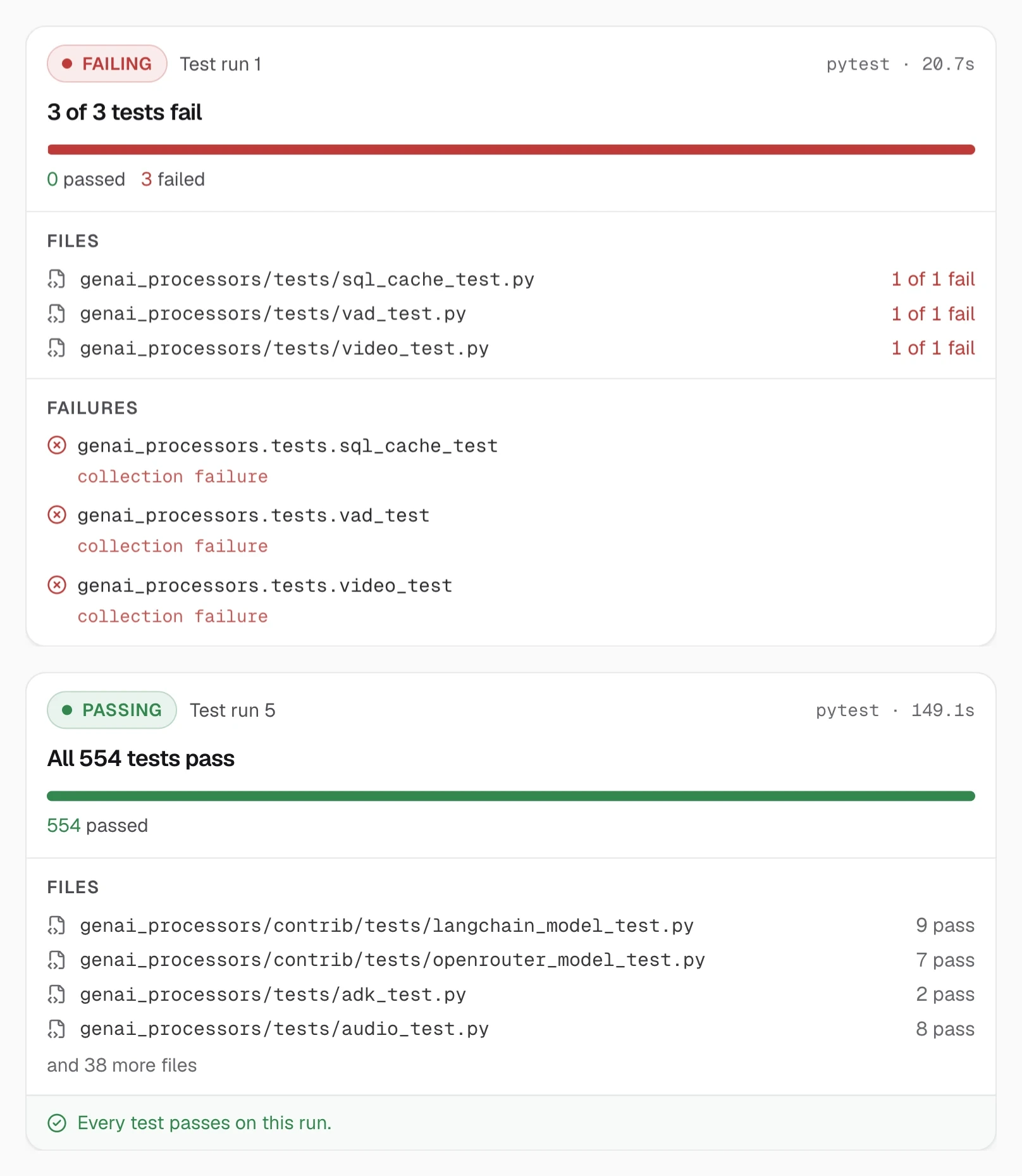
The test results card is an A2UI surface: the agent describes the card as components and
data, and CopilotKit draws it with the app's own component. run_tests runs the suite, turns the output into a
TestReport, and returns a2ui_operations next to the results the model reads:
async def run_tests(target: str = "") -> dict[str, Any]:
    """Runs the test suite and shows a live report card to the user."""
    # ...
    return {
        # Painted by CopilotKit's A2UI middleware; the model can ignore it.
        "a2ui_operations": report_surface_operations(report, run=number),
        "status": report.status,
        "summary": report.headline(),
        # ...
    }
a2ui.py builds the three operations: create the surface, set its one TestReport component, and fill its data:
# Must match CATALOG_ID in src/a2ui/catalog.tsx (the Next.js app).
CATALOG_ID = "https://repo-doctor.dev/a2ui/catalog/v1"

# ...

COMPONENTS: list[dict[str, Any]] = [
    {
        "id": "root",
        "component": "TestReport",
        **{name: {"path": f"/{name}"} for name in _BINDINGS},
    }
]

# ...

def report_surface_operations(report: TestReport, *, run: int) -> list[dict[str, Any]]:
    sid = surface_id(run)
    return [
        {"version": "v0.9", "createSurface": {"surfaceId": sid, "catalogId": CATALOG_ID}},
        {"version": "v0.9", "updateComponents": {"surfaceId": sid, "components": COMPONENTS}},
        {
            "version": "v0.9",
            "updateDataModel": {
                "surfaceId": sid,
                "path": "/",
                "value": report_data(report, run=run),
            },
        },
    ]
The component tree never changes. Every prop is a { path } binding into the data model, and each run only fills
the data. Each run also gets its own surface id, test-run-1, test-run-2 and so on, so a new run adds a new card
instead of replacing the last one.
On the web side, the definitions are the contract between the agent and the card: the components the agent may
name, with a zod schema for each one's props. Each prop can be a value or a { path } binding:
const binding = z.object({ path: z.string() });
const dyn = <T extends z.ZodTypeAny>(schema: T) => z.union([schema, binding]);

// ...

export const definitions = {
  TestReport: {
    description:
      "The result of one test run: status, counts, per-file results and failures.",
    props: z.object({
      run: dyn(z.number()),
      status: dyn(z.enum(["passed", "failed", "error"])),
      headline: dyn(z.string()),
      // ...
      files: dyn(z.array(FileResult)),
      failures: dyn(z.array(FailedTest)),
      // ...
    }),
  },
} satisfies CatalogDefinitions;
createCatalog joins the definitions and a renderer that maps the props onto the app's own TestReport React
component, under the same catalog id the agent uses. This is the catalog the provider registered in the first
step:
"use client";

import { createCatalog } from "@copilotkit/a2ui-renderer";
import type { CatalogRenderers } from "@copilotkit/a2ui-renderer";
import { definitions } from "./definitions";
// ...
import { TestReport, list, num, str } from "./test-report";

/** Must match CATALOG_ID in agent/src/repo_doctor/a2ui.py. */
export const CATALOG_ID = "https://repo-doctor.dev/a2ui/catalog/v1";

const renderers: CatalogRenderers<Definitions> = {
  TestReport: ({ props }) => {
    const status = str(props.status);
    return (
      <TestReport
        run={num(props.run)}
status={status === "passed" || status === "error" ? status : "failed"}
        headline={str(props.headline)}
        // ...
        files={list<FileResultData>(props.files)}
        failures={list<FailedTestData>(props.failures)}
        summary={str(props.summary)}
      />
    );
  },
};

export const catalog = createCatalog(definitions, renderers, {
  catalogId: CATALOG_ID,
  includeBasicCatalog: false,
});
includeBasicCatalog: false leaves out A2UI's basic components, so TestReport is the only component this catalog
can draw. Each test run has its own surface, so every run stays in the chat, from the first red one to the final
green one:
Build the side panel#
Every tool wrote its part of the story into shared state. This is its shape on the web side:
const AgentState = z.object({
  repo: Repo.optional().catch(undefined),
  install: Install.optional().catch(undefined),
  testRuns: z.array(TestRun).catch([]),
  // ...
  checks: z.array(Check).catch([]),
  approvals: z.array(Approval).catch([]),
  push: Push.optional().catch(undefined),
});
Each field comes from one place:
repofromclone_repo, andinstallfrominstall_dependenciestestRunsgets a row from eachrun_tests, andchecksone from eachrun_checkapprovalsgets each of your decisionspushfromgit_push
useAgent gives the browser that state. One provider reads it once and shares it with
the cards and the panel:
export function WorkspaceProvider({ children }: { children: ReactNode }) {
  const { agent } = useAgent({ agentId: AGENT_ID });
  const state = useMemo(() => parseAgentState(agent.state), [agent.state]);
  // ...
}
The state comes over the network, so parseAgentState checks it with zod first. The panel in
workspace-panel.tsx then reads plain fields like state.checks
and state.approvals.
Because the approvals live in shared state, they come back when you reopen a conversation. Download report at the bottom builds a Markdown report in the browser from the same state and messages.
Try it on genai-processors#
Start both servers: pnpm dev for the web app, and uv run python -m repo_doctor.server in agent/. (In the finished
example, pnpm dev starts both.) Open http://localhost:3000, type your name in the navbar,
and ask:
Why is CI failing on google-gemini/genai-processors?Here is what happens, step by step:
- The agent clones the repository and reads its CI. The workflow "Python package" fails at test collection.
- It asks to install the project with the same extras CI installs. Approve it.
- The first test results card is red.
- It asks to run a short check that reproduces the failure. Approve it, and the check fails.
- It asks to edit
pyproject.tomlandgenai_processors/mcp.py. Approve it, and the diff card shows both changes. - It reinstalls and runs the same check, which now passes. The final test results card is green: all 554 tests pass.
- It asks to push the fix branch. Approve it, and the chat ends with a short summary. Download report in the side panel saves the whole story.
The model decides the order, so a run can take a slightly different path. Deny any step to see the agent stop and ask how you want to continue.
Look under the hood with the CopilotKit Inspector#
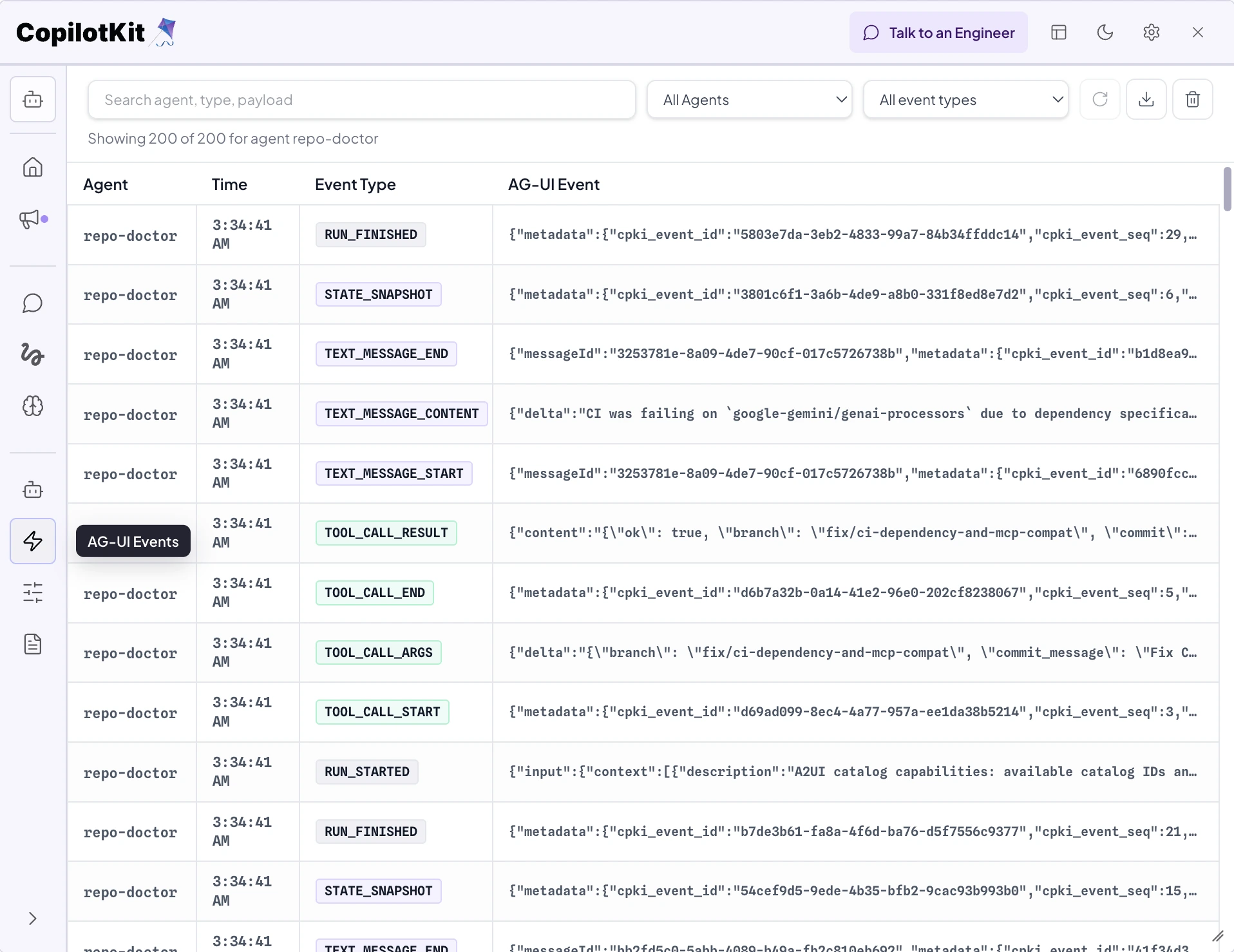
Click the CopilotKit logo in the corner of your app to open the CopilotKit Inspector. The
enableInspector prop on the provider turns it on in development, so you can watch everything that passes between
your app and the agent.
Go to AG-UI Events. One run looks like this:
RUN_STARTEDopens the run.- Each tool call streams in as
TOOL_CALL_START,TOOL_CALL_ARGSandTOOL_CALL_END, and its result comes back asTOOL_CALL_RESULT. - When
run_testsreturns, anACTIVITY_SNAPSHOTof typea2ui-surfacecarries the test results card. - The agent's reply streams as
TEXT_MESSAGE_START,TEXT_MESSAGE_CONTENTandTEXT_MESSAGE_END. - A
STATE_SNAPSHOTcarries the shared state the side panel reads. RUN_FINISHEDcloses the run.
The Agent tab shows the current shared state, including every approval, and the messages so far with each tool call and its arguments.
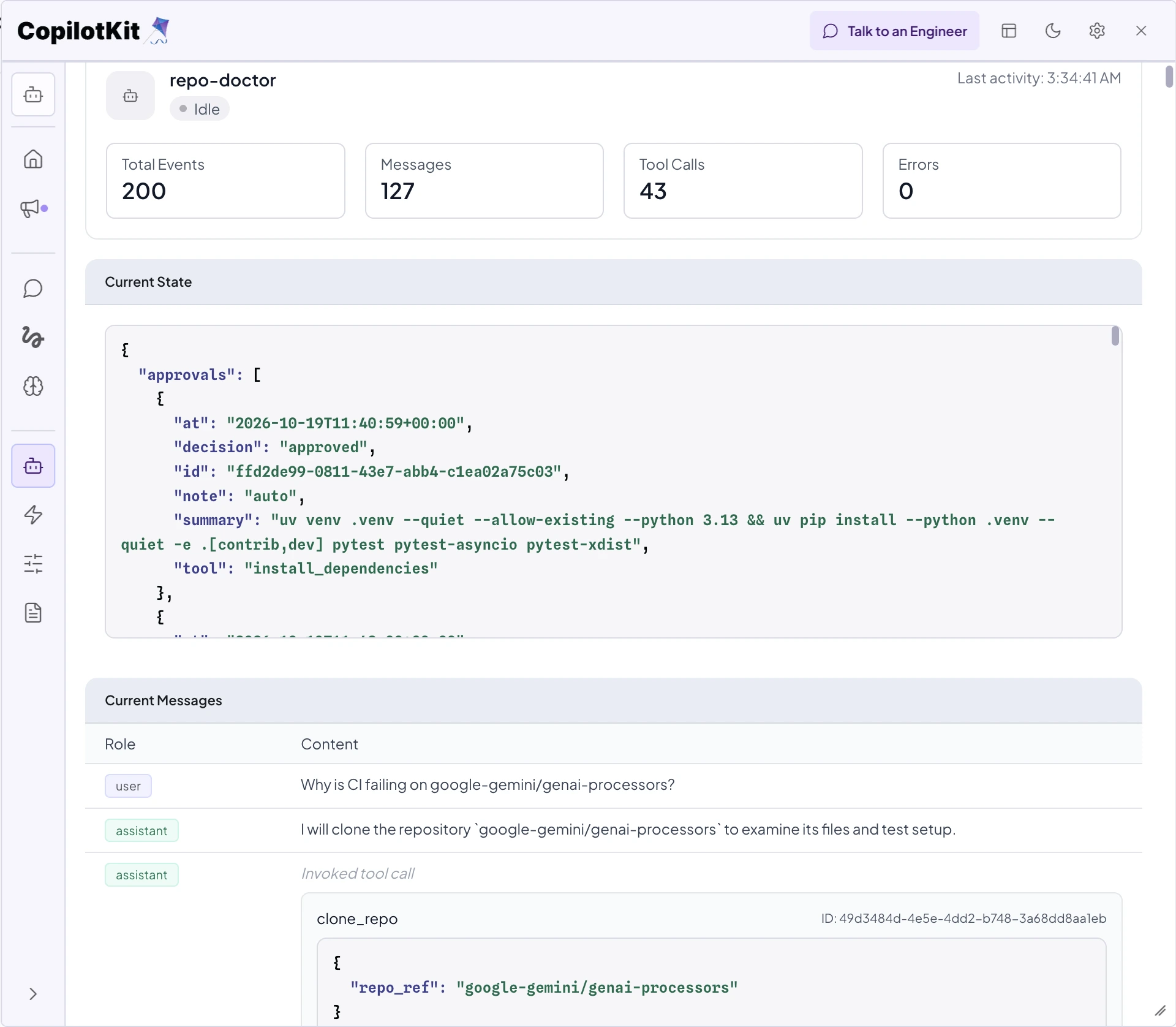
If a card never shows up, start here. You'll see whether the agent called the tool at all, and what came back.
What the full example adds#
The steps above cover the core of the app. The example also has these, each in its own file:
- A folder per conversation.
ThreadScopedAntigravityAgentgives each conversation its own workspace and tools, and cleans everything up when you delete the conversation (agent.py). - Saved conversations. After a clone, a push and every run, the repository, the pushed branches and the
harness's conversation are saved to Cloud Storage, and restored after a restart (
snapshot.py). - An install guard. Package installs through
run_commandare rejected before they run, so every install goes throughinstall_dependencies, and PyTorch always installs as CPU wheels (guards.py). - Disk limits. A conversation's Python venv is deleted when its session closes (
venvs.py). The agent's own uv cache is pruned at startup and cleared when it grows past a limit (uvcache.py). - More than Python. The install and test commands are worked out from the repository's own files for Python,
Node, Go and Rust projects. A project whose toolchain is not installed is reported as unsupported instead of
failing halfway; the Cloud Run image includes Python and Node (npm, pnpm and Yarn) (
project.py). - Local-only pushes and a clean environment. API keys and GitHub tokens are removed from the environment that
shell commands and the cloned code inherit, and any push to a GitHub URL is sent to a host that does not exist (
safety.py). - The downloadable report. A Markdown summary of the conversation, built in the browser from the messages and
shared state, with no model call (
report.ts).
CopilotKit Intelligence: save conversations and see Product Analytics#
CopilotKit Intelligence saves every conversation under the person who started it, and turns the runs into Product Analytics.
Let your coding agent handle setup
You can ask your coding agent to use the CopilotKit CLI to connect a CopilotKit Intelligence project to this
app. It runs npx copilotkit@latest login and
npx copilotkit@latest project select --create repo-doctor --env-name .env, which writes
CPK_INTELLIGENCE_API_KEY to .env. Restart pnpm dev and a conversation list appears on the left.
These are the runtime lines left out earlier. With a key, the runtime connects CopilotKit Intelligence. Without one, runs stay in memory:
const runtime = new CopilotRuntime({
  // ...
  ...(env.CPK_INTELLIGENCE_API_KEY
    ? {
        // Threads (AG-UI Streams) and Product Analytics.
        intelligence: new CopilotKitIntelligence({
          apiKey: env.CPK_INTELLIGENCE_API_KEY,
          ...(env.INTELLIGENCE_API_URL
            ? { apiUrl: env.INTELLIGENCE_API_URL }
            : {}),
          ...(env.INTELLIGENCE_GATEWAY_WS_URL
            ? { wsUrl: env.INTELLIGENCE_GATEWAY_WS_URL }
            : {}),
        }),
        // Off: the runtime would name each new thread by running this agent a
        // second time (a new thread id, so a second Antigravity session,
        // workspace and Gemini turn). The thread list names threads from their
        // first message instead (src/components/shell/thread-list.tsx).
        generateThreadNames: false,
        // The person who typed their name in the navbar (a cookie), so threads
        // and Product Analytics are per person. Not authentication: replace it
        // with your own server-verified session before going public.
        identifyUser: (request: Request) =>
          userFromCookieHeader(request.headers.get("cookie")) ?? {
            id: env.DEMO_USER_ID,
            name: "Demo user",
          },
      }
    : { runner: new InMemoryAgentRunner() }),
});Threads#
Every conversation is saved as a thread under the person who started it:
- The name you type in the navbar becomes the user id, and
identifyUserpasses it with every run. - The conversation list on the left comes from
useThreads. You can archive or delete a conversation from it. - Use the same name on another device to pick up where you left off, with the cards, test results and approvals.
See AG-UI Streams for how they work.
In the CopilotKit Intelligence dashboard, open Threads to see every event of every run. A run that stopped for an
approval ends with an interrupt outcome that holds the exact command waiting for an answer.
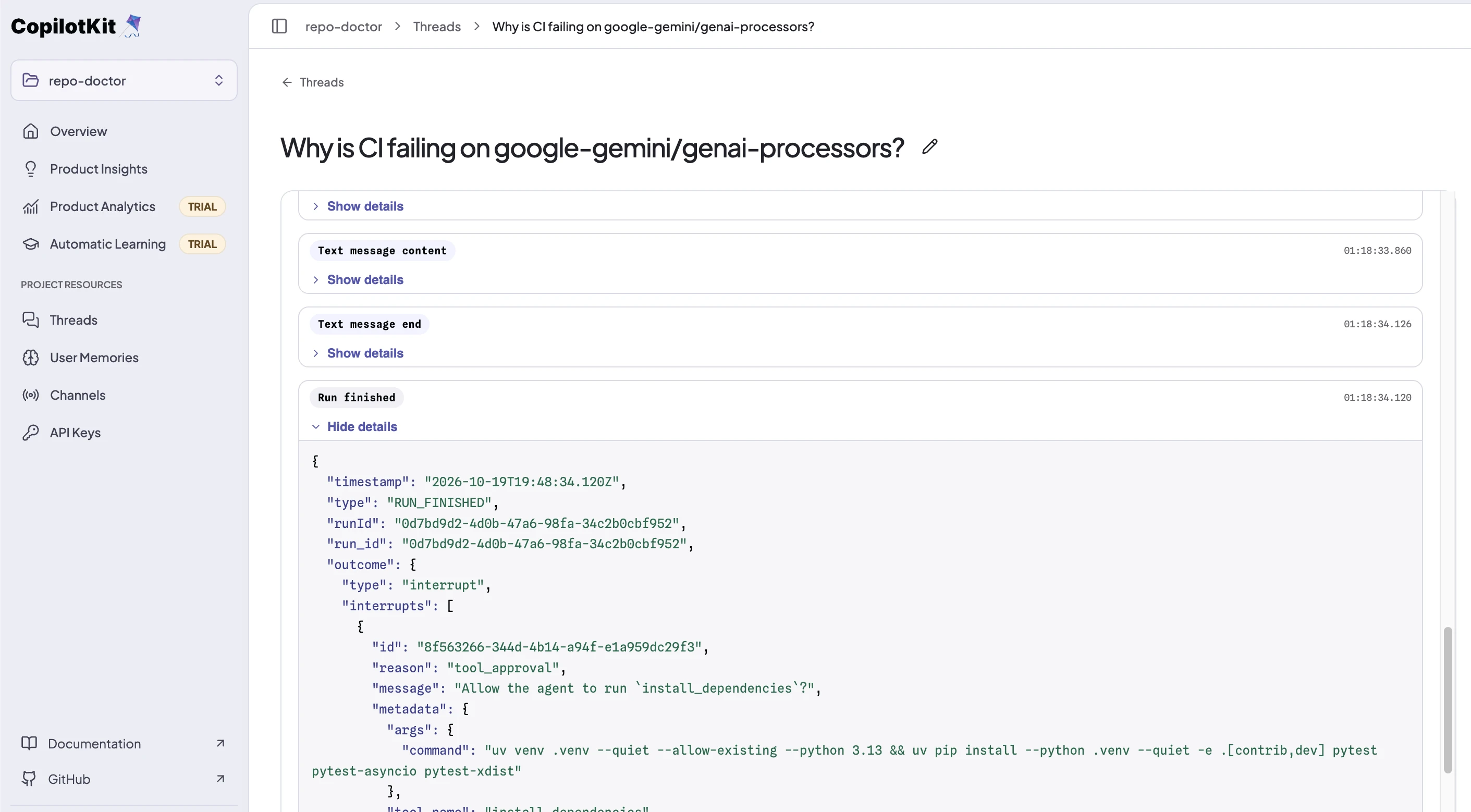
The name is not a login: anyone who types it sees those conversations. Before real users get the link, replace
identifyUser with the user from your own session.
Product Analytics#
Product Analytics reads the same runs, with nothing extra to set up:
- Activity shows how many people used the agent and which tools it calls most.
- Reliability shows the error rate over time and the share of runs that finished without an error.
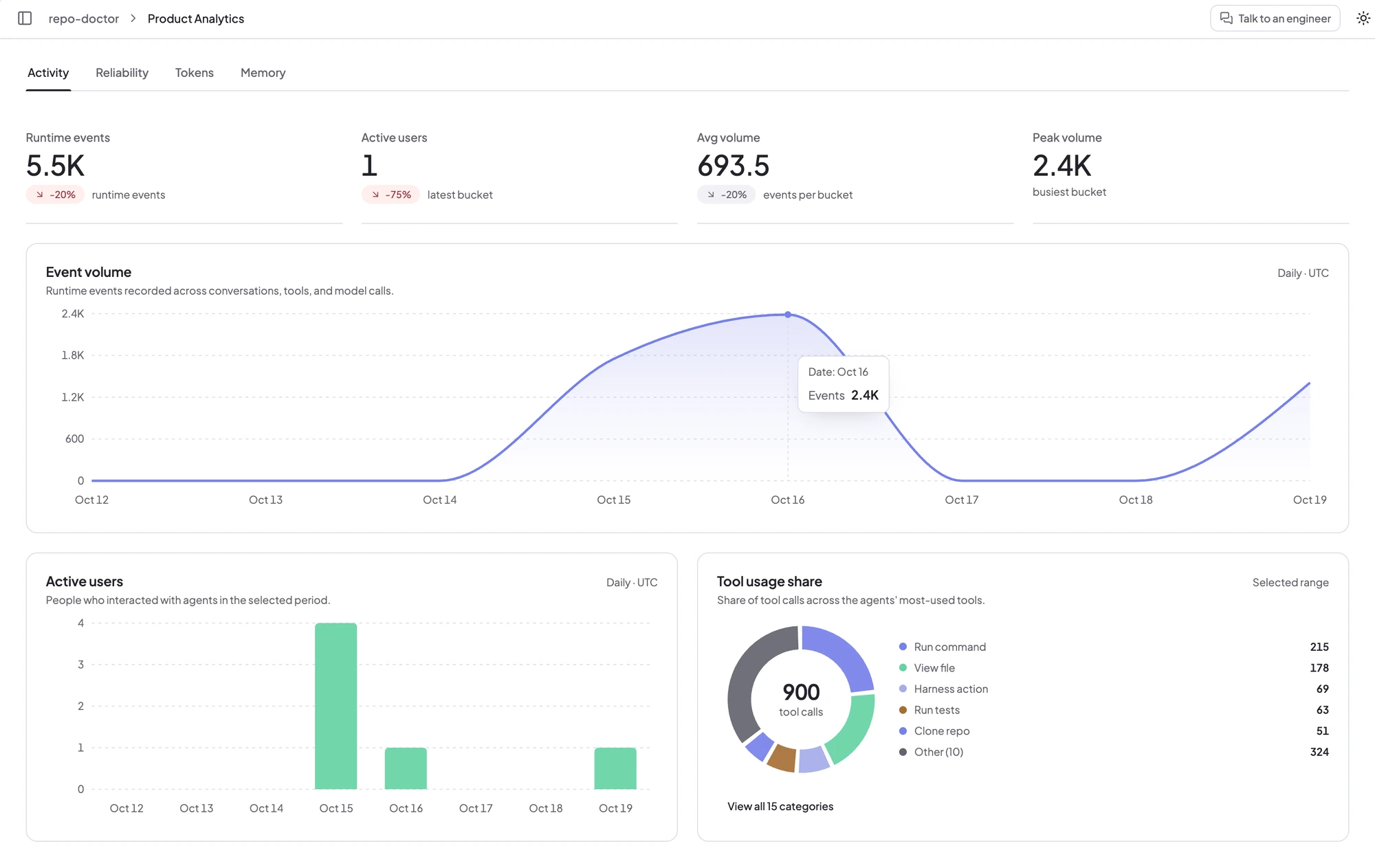
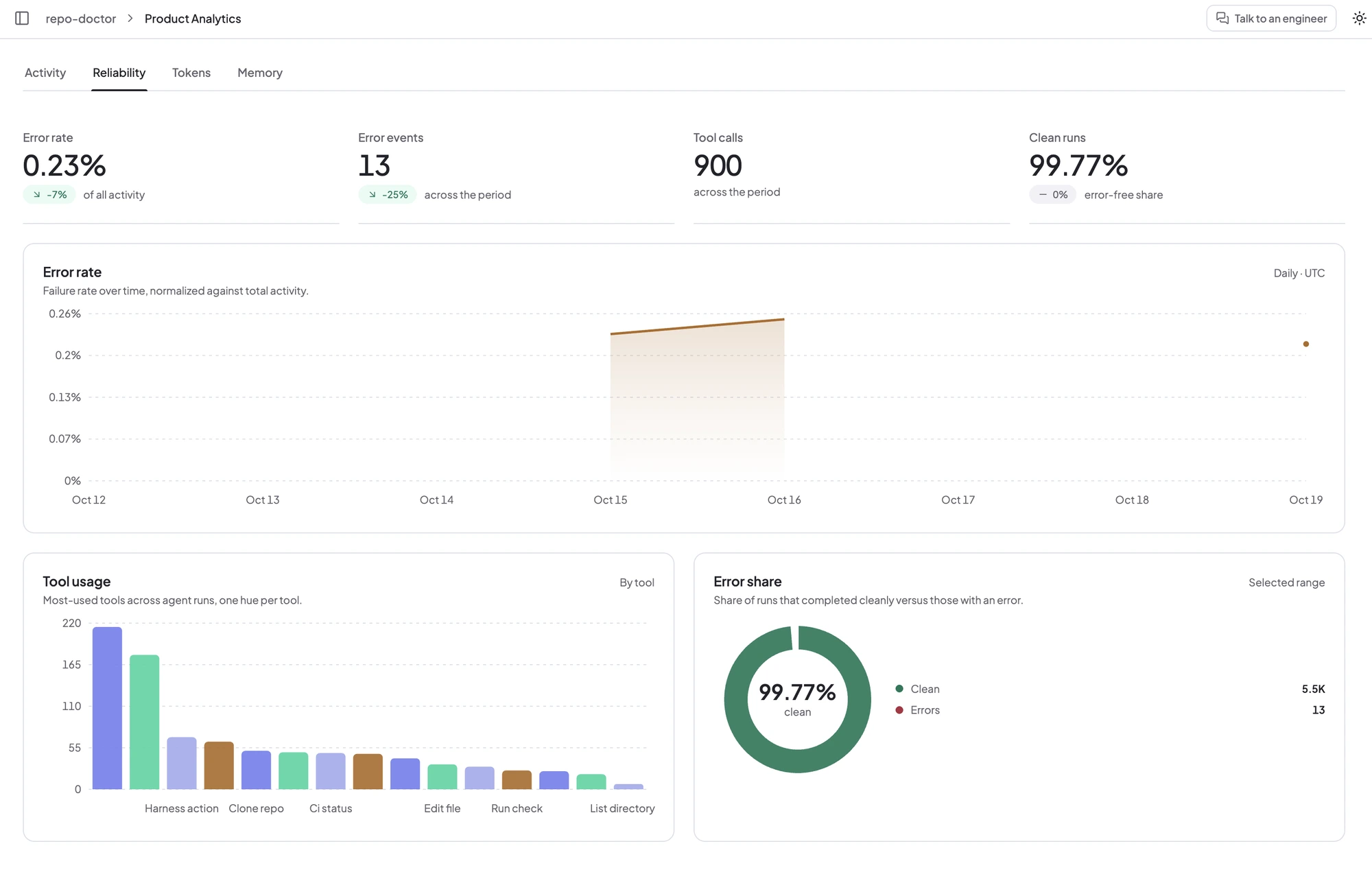
Active users are counted by the user id your app passes, so give each person a stable id.
Deploy to Google Cloud#
The whole app runs as one Cloud Run service: the UI, the CopilotKit runtime and the agent, built from one image.
Secrets live in Secret Manager, and each conversation is saved to a Cloud Storage bucket. Run these from
examples/showcases/antigravity-repo-doctor with the gcloud CLI, after
gcloud auth login.
Build the image:
PROJECT=your-project
REGION=us-central1
IMAGE=$REGION-docker.pkg.dev/$PROJECT/repo-doctor/app
gcloud config set project $PROJECT

gcloud services enable run.googleapis.com artifactregistry.googleapis.com \
  cloudbuild.googleapis.com secretmanager.googleapis.com
gcloud artifacts repositories create repo-doctor --repository-format=docker --location=$REGION
gcloud builds submit --tag $IMAGE
Put your keys in Secret Manager. This reads them from your .env without printing them:
secret() { grep "^$1=" .env | cut -d= -f2- | tr -d '\n"' | gcloud secrets create "$2" --data-file=-; }
secret GEMINI_API_KEY gemini-api-key
secret CPK_INTELLIGENCE_API_KEY cpk-intelligence-api-key
secret GITHUB_TOKEN github-token
Create a service account that can only read those secrets and the bucket, and the bucket itself:
gcloud iam service-accounts create repo-doctor --display-name="Repo Doctor"
SA=repo-doctor@$PROJECT.iam.gserviceaccount.com
# A new service account takes a few seconds to appear, so each binding retries.
for s in gemini-api-key cpk-intelligence-api-key github-token; do
  for try in 1 2 3 4 5 6; do
    gcloud secrets add-iam-policy-binding $s --member=serviceAccount:$SA \
      --role=roles/secretmanager.secretAccessor && break
    sleep 10
  done
done

BUCKET=$PROJECT-repo-doctor-ws
gcloud storage buckets create gs://$BUCKET --location=$REGION --uniform-bucket-level-access
gcloud storage buckets add-iam-policy-binding gs://$BUCKET \
  --member=serviceAccount:$SA --role=roles/storage.objectUser
Deploy it as a private service:
gcloud run deploy repo-doctor \
  --image $IMAGE --region $REGION --service-account $SA \
  --min-instances 1 --max-instances 1 \
  --cpu 4 --memory 16Gi --no-cpu-throttling \
  --timeout 3600 --execution-environment gen2 \
  --set-secrets GEMINI_API_KEY=gemini-api-key:latest,CPK_INTELLIGENCE_API_KEY=cpk-intelligence-api-key:latest,GITHUB_TOKEN=github-token:latest \
  --set-env-vars GEMINI_MODEL=gemini-3.5-flash,DEMO_USER_ID=repo-doctor-demo,WORKSPACE_BUCKET=gs://$BUCKET \
  --no-allow-unauthenticated

APP_URL=$(gcloud run services describe repo-doctor --region $REGION --format='value(status.url)')
gcloud run services update repo-doctor --region $REGION --update-env-vars APP_URL=$APP_URL
Then open it on your machine through an authenticated proxy, at http://localhost:8080:
gcloud run services proxy repo-doctor --region $REGION --port 8080The service runs exactly one instance that never scales to zero, because a conversation's live session and any
approval card it waits on are held in memory. --no-cpu-throttling keeps the agent working while it waits for you.
After every run, the agent saves the conversation to its own folder in the bucket: the repository with its edits, the pushed fix branches, and the agent's session. If the service restarts, the next message in that conversation brings them back and the agent continues where it left off. Installed packages are not saved; the agent reinstalls them.
Protect the service before going public
Code from the cloned repositories runs inside the container with network access, and every message spends your
Gemini credits. Keep the service private and open it through gcloud run services proxy, or put it behind
IAP. A production deployment needs
real authentication and a sandbox per conversation. Limiting outbound traffic to GitHub, Gemini and the package
registries is not set up here;
the architecture notes
describe how.
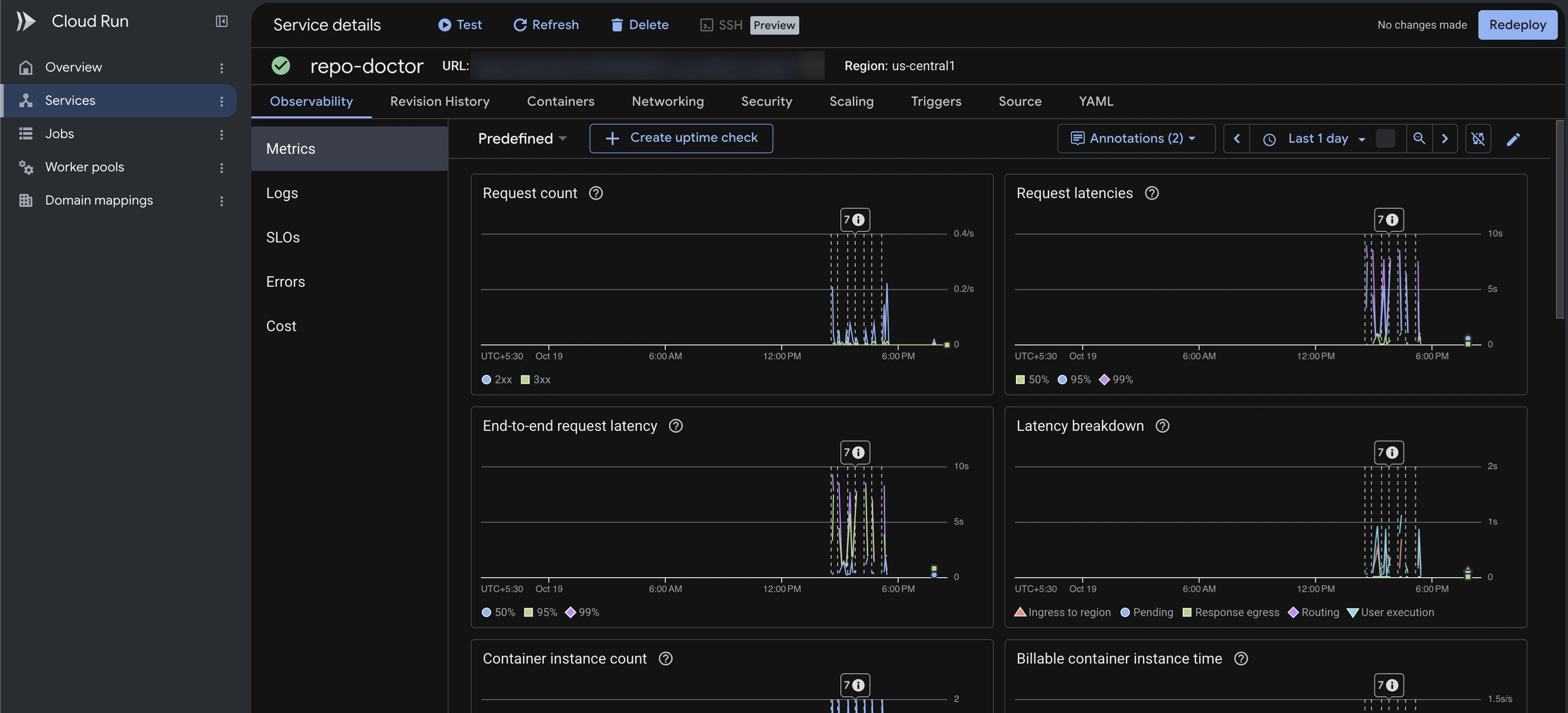
For logs, updates after a code change, and the public link option, see the README.
Where to go next#
- Add a tool. Write another function in
tools.pyand a matchinguseRenderToolcomponent. The AG-UI wiring stays the same. - Push to your own fork. The example keeps pushes local on purpose, so pushing to a real repository needs a small code change.
- Use your own repositories. Swap the start-screen cards in
src/lib/example-repos.ts. - Read more. Human-in-the-loop covers approvals and interrupts, and A2UI covers agent-described UI.
Get the code#
The finished example is in the CopilotKit repo at
examples/showcases/antigravity-repo-doctor.
It includes the Python agent, the Next.js app, a Dockerfile for Cloud Run, and an end-to-end test with a scripted
model.