Declarative (A2UI)
Use A2UI to declaratively generate user interfaces.
Open your coding agent in your project's folder, or in an empty folder for a new app.This runs in a coding agent on your computer.
Build an A2A agent, configure it to use A2UI, use the A2UI composer to generate widgets, and render them in your CopilotKit powered app.
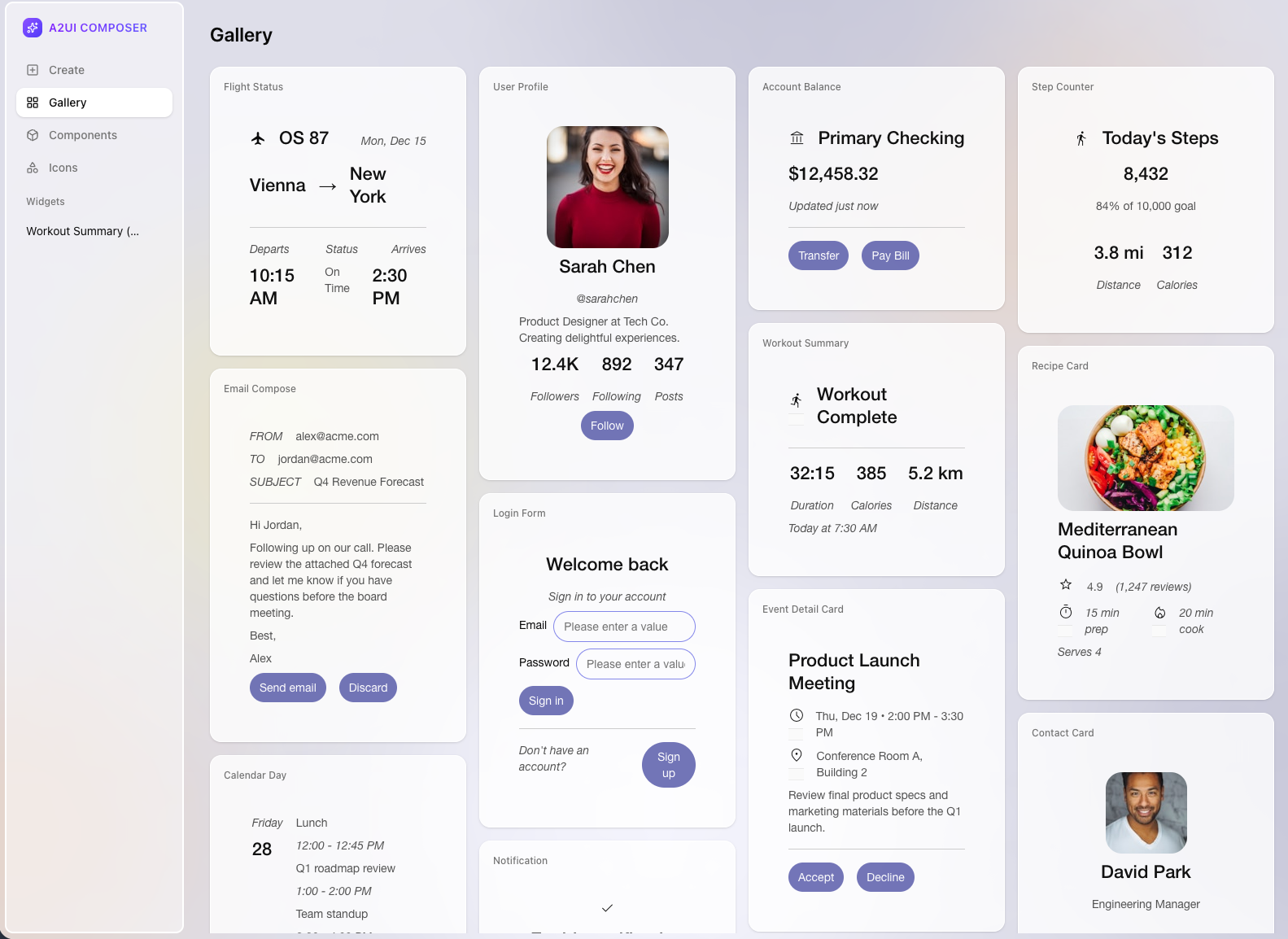
Demo of the A2UI Composer - powered by CopilotKit
Getting started#
Use the A2A starter template#
git clone https://github.com/CopilotKit/CopilotKit.git
cd CopilotKit/examples/integrations/a2a-a2ui
The archived copilotkit/with-a2a-a2ui starter now lives at this monorepo path. The current starter uses its local v0.8 renderer and emits a JSON list of v0.8 operation objects. This page documents that accepted starter payload. Migrating the starter to the v0.9 renderer and a2ui_operations envelope requires changes outside this documentation target.
Install dependencies#
pnpm installRun and connect your agent#
pnpm devConfigure your agent to use A2UI#
Setting up your agent with components#
The starter's current agent accepts the v0.8 operation list below. Keep the operation order and shapes when adding your own components; each list entry is sent as an individual A2A data part by the starter agent.
RESTAURANT_UI_EXAMPLES = """
...
---BEGIN SINGLE_COLUMN_LIST_EXAMPLE---
[
  {{ "beginRendering": {{ "surfaceId": "default", "root": "root-column", "styles": {{ "primaryColor": "#FF0000", "font": "Roboto" }} }} }},
  {{ "surfaceUpdate": {{
    "surfaceId": "default",
    "components": [
      {{ "id": "root-column", "component": {{ "Column": {{ "children": {{ "explicitList": ["title-heading", "item-list"] }} }} }} }},
      {{ "id": "title-heading", "component": {{ "Text": {{ "usageHint": "h1", "text": {{ "literalString": "Top Restaurants" }} }} }} }},
      {{ "id": "item-list", "component": {{ "List": {{ "direction": "vertical", "children": {{ "template": {{ "componentId": "item-card-template", "dataBinding": "/items" }} }} }} }} }},
      {{ "id": "item-card-template", "component": {{ "Card": {{ "child": "card-layout" }} }} }},
      {{ "id": "card-layout", "component": {{ "Row": {{ "children": {{ "explicitList": ["template-image", "card-details"] }} }} }} }},
      {{ "id": "template-image", "weight": 1, "component": {{ "Image": {{ "url": {{ "path": "imageUrl" }} }} }} }},
      {{ "id": "card-details", "weight": 2, "component": {{ "Column": {{ "children": {{ "explicitList": ["template-name", "template-rating", "template-detail", "template-link", "template-book-button"] }} }} }} }},
      {{ "id": "template-name", "component": {{ "Text": {{ "usageHint": "h3", "text": {{ "path": "name" }} }} }} }},
      {{ "id": "template-rating", "component": {{ "Text": {{ "text": {{ "path": "rating" }} }} }} }},
      {{ "id": "template-detail", "component": {{ "Text": {{ "text": {{ "path": "detail" }} }} }} }},
      {{ "id": "template-link", "component": {{ "Text": {{ "text": {{ "path": "infoLink" }} }} }} }},
      {{ "id": "template-book-button", "component": {{ "Button": {{ "child": "book-now-text", "primary": true, "action": {{ "name": "book_restaurant", "context": [{{ "key": "restaurantName", "value": {{ "path": "name" }} }}, {{ "key": "imageUrl", "value": {{ "path": "imageUrl" }} }}, {{ "key": "address", "value": {{ "path": "address" }}}} ] }} }} }} }},
      {{ "id": "book-now-text", "component": {{ "Text": {{ "text": {{ "literalString": "Book Now" }} }} }} }}
    ]
  }} }},
  {{ "dataModelUpdate": {{
    "surfaceId": "default",
    "path": "/",
    "contents": [
      {{ "key": "items", "valueMap": [
        {{ "key": "item1", "valueMap": [
          {{ "key": "name", "valueString": "The Fancy Place" }},
          {{ "key": "rating", "valueNumber": 4.8 }},
          {{ "key": "detail", "valueString": "Fine dining experience" }},
          {{ "key": "infoLink", "valueString": "https://example.com/fancy" }},
          {{ "key": "imageUrl", "valueString": "https://example.com/fancy.jpg" }},
          {{ "key": "address", "valueString": "123 Main St" }}
        ] }},
        {{ "key": "item2", "valueMap": [
          {{ "key": "name", "valueString": "Quick Bites" }},
          {{ "key": "rating", "valueNumber": 4.2 }},
          {{ "key": "detail", "valueString": "Casual and fast" }},
          {{ "key": "infoLink", "valueString": "https://example.com/quick" }},
          {{ "key": "imageUrl", "valueString": "https://example.com/quick.jpg" }},
          {{ "key": "address", "valueString": "456 Oak Ave" }}
        ] }}
      ] }}
    ]
  }} }}
]
---END SINGLE_COLUMN_LIST_EXAMPLE---
# ... more examples below
The widgets are injected into the agent's prompt, in this case using the RESTAURANT_UI_EXAMPLES variable.
Widgets are defined for the agent using an example of the JSON array it should output, wrapped in a comment block.
- A comment indicating the start of the example
- beginRendering: Starts the v0.8 surface
- surfaceUpdate: Defines the v0.8 component tree
- dataModelUpdate: Provides the v0.8 data model contents
- A comment indicating the end of the example
In the example repo, all of the widgets are defined in a single variable in the prompt_builder.py file, but you can structure them however you like, they simply need to be injected into the agent's prompt in a clearly delineated way. The v0.9 SDK migration is not demonstrated by this starter page.
The current starter's v0.8 renderer displays the Book Now control without an onClick handler or action dispatch. The button is inert, so no click reaches the agent and the executor's book_restaurant branch is not reached. Adding action wiring is outside this documentation-only change.
Generating components with the A2UI Composer#
If you want an easy way to generate components, you can use the A2UI Composer. Go to https://a2ui-composer.ag-ui.com/ to create your own components. The composer will generate the JSON spec for you, all you have to do is copy and paste it into your agent's prompt.
Configuring your application to render A2UI#
AG-UI handles communicating with your a2a agent, and passes the a2ui messages back and forth as ActivityMessage objects.
In order to render them in your frontend, you need to configure activity message rendering.
The current starter registers its local v0.8 renderer and its v0.8 theme. The setup below mirrors that app/page.tsx; the v0.9 renderer and a2ui_operations envelope are documented in the other A2UI integration guides.
"use client";

import { CopilotChat, CopilotKitProvider } from "@copilotkit/react-core/v2";
import { a2uiV08Renderer } from "./components/a2ui-v0-8-renderer";
import { theme } from "./theme";

// Disable static optimization for this page
export const dynamic = "force-dynamic";

const activityRenderers = [a2uiV08Renderer];

export default function Home() {
  return (
    <CopilotKitProvider
      runtimeUrl="/api/copilotkit"
      useSingleEndpoint={false}
      a2ui={{ theme }}
      renderActivityMessages={activityRenderers}
    >
      <main
        className="h-full overflow-auto w-screen"
        style={{ minHeight: "100dvh" }}
      >
        <CopilotChat className="h-full" />
      </main>
    </CopilotKitProvider>
  );
}import { Styles, type Types } from "@a2ui/lit/0.8";
/** Elements */
const a = {
"typography-f-sf": true,
"typography-fs-n": true,
"typography-w-500": true,
"layout-as-n": true,
"layout-dis-iflx": true,
"layout-al-c": true,
};
const audio = {
"layout-w-100": true,
};
const body = {
"typography-f-s": true,
"typography-fs-n": true,
"typography-w-400": true,
"layout-mt-0": true,
"layout-mb-2": true,
"typography-sz-bm": true,
"color-c-n10": true,
};
const button = {
"typography-f-sf": true,
"typography-fs-n": true,
"typography-w-500": true,
"layout-pt-3": true,
"layout-pb-3": true,
"layout-pl-5": true,
"layout-pr-5": true,
"layout-mb-1": true,
"border-br-16": true,
"border-bw-0": true,
"border-c-n70": true,
"border-bs-s": true,
"color-bgc-s30": true,
"color-c-n100": true,
"behavior-ho-80": true,
};
const heading = {
"typography-f-sf": true,
"typography-fs-n": true,
"typography-w-500": true,
"layout-mt-0": true,
"layout-mb-2": true,
"color-c-n10": true,
};
const h1 = {
...heading,
"typography-sz-tl": true,
};
const h2 = {
...heading,
"typography-sz-tm": true,
};
const h3 = {
...heading,
"typography-sz-ts": true,
};
const h4 = {
...heading,
"typography-sz-bl": true,
};
const h5 = {
...heading,
"typography-sz-bm": true,
};
const iframe = {
"behavior-sw-n": true,
};
const input = {
"typography-f-sf": true,
"typography-fs-n": true,
"typography-w-400": true,
"layout-pl-4": true,
"layout-pr-4": true,
"layout-pt-2": true,
"layout-pb-2": true,
"border-br-6": true,
"border-bw-1": true,
"color-bc-s70": true,
"border-bs-s": true,
"layout-as-n": true,
"color-c-n10": true,
};
const p = {
"typography-f-s": true,
"typography-fs-n": true,
"typography-w-400": true,
"layout-m-0": true,
"typography-sz-bm": true,
"layout-as-n": true,
"color-c-n10": true,
};
const orderedList = {
"typography-f-s": true,
"typography-fs-n": true,
"typography-w-400": true,
"layout-m-0": true,
"typography-sz-bm": true,
"layout-as-n": true,
};
const unorderedList = {
"typography-f-s": true,
"typography-fs-n": true,
"typography-w-400": true,
"layout-m-0": true,
"typography-sz-bm": true,
"layout-as-n": true,
};
const listItem = {
"typography-f-s": true,
"typography-fs-n": true,
"typography-w-400": true,
"layout-m-0": true,
"typography-sz-bm": true,
"layout-as-n": true,
};
const pre = {
"typography-f-c": true,
"typography-fs-n": true,
"typography-w-400": true,
"typography-sz-bm": true,
"typography-ws-p": true,
"layout-as-n": true,
};
const textarea = {
...input,
"layout-r-none": true,
"layout-fs-c": true,
};
const video = {
"layout-el-cv": true,
};
const aLight = Styles.merge(a, { "color-c-n5": true });
const inputLight = Styles.merge(input, { "color-c-n5": true });
const textareaLight = Styles.merge(textarea, { "color-c-n5": true });
const buttonLight = Styles.merge(button, { "color-c-n100": true });
const h1Light = Styles.merge(h1, { "color-c-n5": true });
const h2Light = Styles.merge(h2, { "color-c-n5": true });
const h3Light = Styles.merge(h3, { "color-c-n5": true });
const h4Light = Styles.merge(h4, { "color-c-n5": true });
const h5Light = Styles.merge(h5, { "color-c-n5": true });
const bodyLight = Styles.merge(body, { "color-c-n5": true });
const pLight = Styles.merge(p, { "color-c-n35": true });
const preLight = Styles.merge(pre, { "color-c-n35": true });
const orderedListLight = Styles.merge(orderedList, {
"color-c-n35": true,
});
const unorderedListLight = Styles.merge(unorderedList, {
"color-c-n35": true,
});
const listItemLight = Styles.merge(listItem, {
"color-c-n35": true,
});
export const theme: Types.Theme = {
additionalStyles: {
Button: {
"--n-35": "var(--n-100)",
},
},
components: {
AudioPlayer: {},
Button: {
"layout-pt-2": true,
"layout-pb-2": true,
"layout-pl-3": true,
"layout-pr-3": true,
"border-br-12": true,
"border-bw-0": true,
"border-bs-s": true,
"color-bgc-p30": true,
"color-c-n100": true,
"behavior-ho-70": true,
},
Card: { "border-br-9": true, "color-bgc-p100": true, "layout-p-4": true },
CheckBox: {
element: {
"layout-m-0": true,
"layout-mr-2": true,
"layout-p-2": true,
"border-br-12": true,
"border-bw-1": true,
"border-bs-s": true,
"color-bgc-p100": true,
"color-bc-p60": true,
"color-c-n30": true,
"color-c-p30": true,
},
label: {
"color-c-p30": true,
"typography-f-sf": true,
"typography-v-r": true,
"typography-w-400": true,
"layout-flx-1": true,
"typography-sz-ll": true,
},
container: {
"layout-dsp-iflex": true,
"layout-al-c": true,
},
},
Column: {
"layout-g-2": true,
},
DateTimeInput: {
container: {
"typography-sz-bm": true,
"layout-w-100": true,
"layout-g-2": true,
"layout-dsp-flexhor": true,
"layout-al-c": true,
},
label: {
"layout-flx-0": true,
},
element: {
"layout-pt-2": true,
"layout-pb-2": true,
"layout-pl-3": true,
"layout-pr-3": true,
"border-br-12": true,
"border-bw-1": true,
"border-bs-s": true,
"color-bgc-p100": true,
"color-bc-p60": true,
"color-c-n30": true,
"color-c-p30": true,
},
},
Divider: {},
Image: {
all: {
"border-br-5": true,
"layout-el-cv": true,
"layout-w-100": true,
"layout-h-100": true,
},
avatar: {},
header: {},
icon: {},
largeFeature: {},
mediumFeature: {},
smallFeature: {},
},
Icon: {},
List: {
"layout-g-4": true,
"layout-p-2": true,
},
Modal: {
backdrop: { "color-bbgc-p60_20": true },
element: {
"border-br-2": true,
"color-bgc-p100": true,
"layout-p-4": true,
"border-bw-1": true,
"border-bs-s": true,
"color-bc-p80": true,
},
},
MultipleChoice: {
container: {},
label: {},
element: {},
},
Row: {
"layout-g-4": true,
},
Slider: {
container: {},
label: {},
element: {},
},
Tabs: {
container: {},
controls: { all: {}, selected: {} },
element: {},
},
Text: {
all: {
"layout-w-100": true,
"layout-g-2": true,
"color-c-p30": true,
},
h1: {
"typography-f-sf": true,
"typography-v-r": true,
"typography-w-400": true,
"layout-m-0": true,
"layout-p-0": true,
"typography-sz-tl": true,
},
h2: {
"typography-f-sf": true,
"typography-v-r": true,
"typography-w-400": true,
"layout-m-0": true,
"layout-p-0": true,
"typography-sz-tm": true,
},
h3: {
"typography-f-sf": true,
"typography-v-r": true,
"typography-w-400": true,
"layout-m-0": true,
"layout-p-0": true,
"typography-sz-ts": true,
},
h4: {
"typography-f-sf": true,
"typography-v-r": true,
"typography-w-400": true,
"layout-m-0": true,
"layout-p-0": true,
"typography-sz-bl": true,
},
h5: {
"typography-f-sf": true,
"typography-v-r": true,
"typography-w-400": true,
"layout-m-0": true,
"layout-p-0": true,
"typography-sz-bm": true,
},
body: {},
caption: {},
},
TextField: {
container: {
"typography-sz-bm": true,
"layout-w-100": true,
"layout-g-2": true,
"layout-dsp-flexhor": true,
"layout-al-c": true,
},
label: {
"layout-flx-0": true,
},
element: {
"typography-sz-bm": true,
"layout-pt-2": true,
"layout-pb-2": true,
"layout-pl-3": true,
"layout-pr-3": true,
"border-br-12": true,
"border-bw-1": true,
"border-bs-s": true,
"color-bgc-p100": true,
"color-bc-p60": true,
"color-c-n30": true,
"color-c-p30": true,
},
},
Video: {
"border-br-5": true,
"layout-el-cv": true,
},
},
elements: {
a: aLight,
audio,
body: bodyLight,
button: buttonLight,
h1: h1Light,
h2: h2Light,
h3: h3Light,
h4: h4Light,
h5: h5Light,
iframe,
input: inputLight,
p: pLight,
pre: preLight,
textarea: textareaLight,
video,
},
markdown: {
p: [...Object.keys(pLight)],
h1: [...Object.keys(h1Light)],
h2: [...Object.keys(h2Light)],
h3: [...Object.keys(h3Light)],
h4: [...Object.keys(h4Light)],
h5: [...Object.keys(h5Light)],
h6: [],
ul: [...Object.keys(unorderedListLight)],
ol: [...Object.keys(orderedListLight)],
li: [...Object.keys(listItemLight)],
a: [...Object.keys(aLight)],
strong: [],
em: [],
},
};Give it a try!#
That's it! When your agent generates an A2UI message, it will be rendered in your frontend. The current starter's v0.8 Book Now control is inert because its renderer doesn't attach a click handler or dispatch an action. No button click reaches the agent until that starter behavior is implemented.